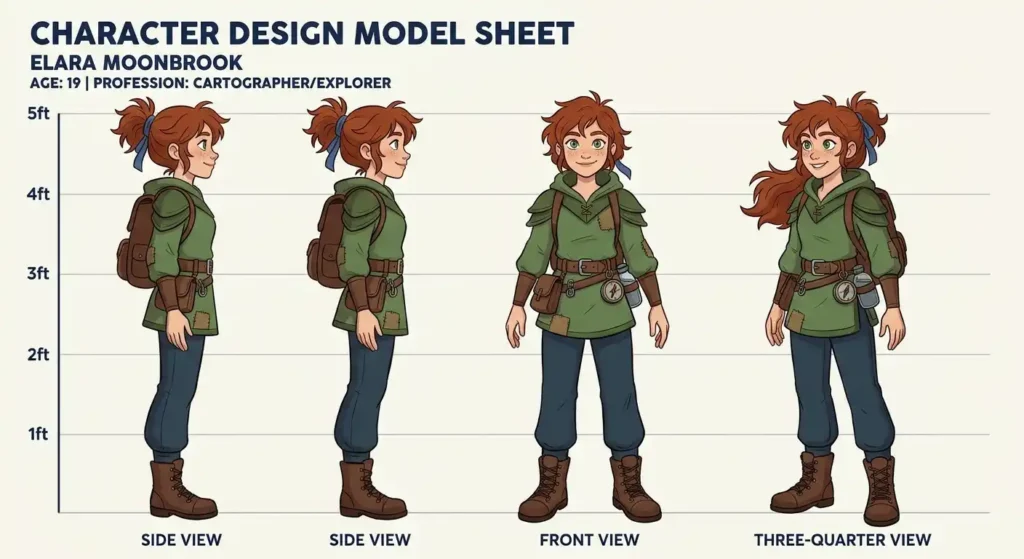
A character design sheet is the page your team opens when they forget what the character looks like. Every piece of it exists to answer a question before somebody has to ask it, like “wait, what does the back of that jacket do?”
Studios call it a model sheet. Game artists call it a character sheet. It’s the same thing, and it’s used everywhere: 2D animation, game development, comics, picture books. If you’ve ever watched a character’s nose drift two pixels left over forty pages, you already know why it matters.
What goes on the sheet
First, do understand, you don’t need to mimic every minute detail of every design idea into a single dashboard. Group your elements by functions so your team gets quick answers without complicating the task. Organize the canvas into the following five working zones.
The Turnaround (Central Zone): build three to five core angles (front, side, and back). It actually meant to map every hidden detail. Add three-quarter view angles if the character carries complex costumes or bulky gear.
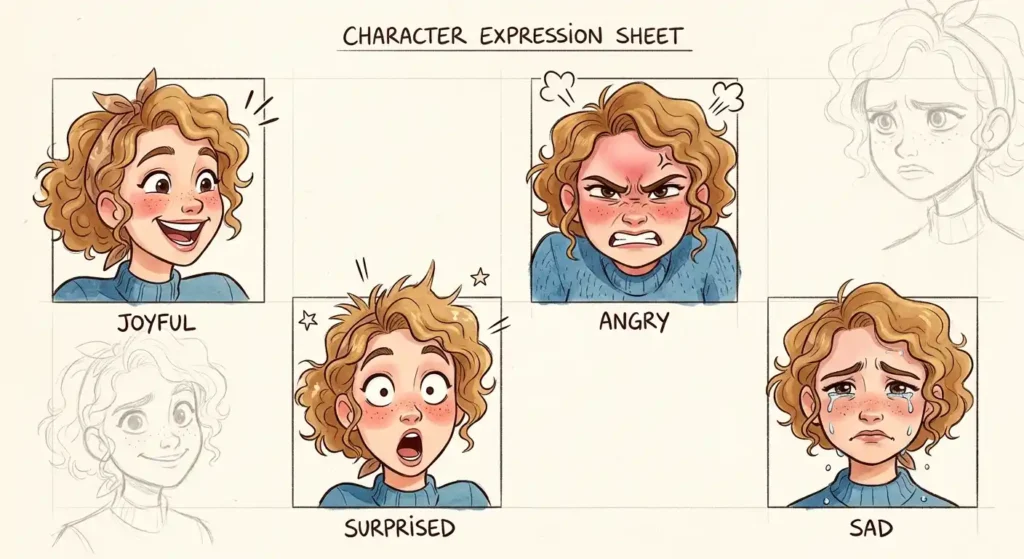
Map the expression grid (Personality Zone): place 4 to 6 headshots beside the body views mapping core emotional ranges. Try to cover the maximum emotional spectrum that projects all around your project – happy, angry, surprised, sad, or neutral draft.
Make sure to keep the skull volume locked no matter how wide the mouth opens. It’s all about managing the balance of emotional smoothness all around.
Mark the proportional rulers: you can use the character’s own head as your measuring tape. Mark vertical head-scale grid units down the side of the canvas like six heads for cartoony style, seven or eight for a heroic build.
Color swatches (Accuracy Check): combine the patterns of flat swatches for skin, hair, and clothing under neutral lightning. Properly check Hex or CMYK values to prevent color drift across different screens.
Organize the layout: manage the expression layout on the left, the turnaround in the middle, swatches on the right, and props and notes in a strip along the bottom that works in balancing the layout
Drawing the turnaround
Draw your turnaround angles in a strict order so everything line up correctly; otherwise the proportion swill drift.
I always start with a quick silhouette check. Block your character’s head, limbs, and torso using simple spheres, cylinders, and boxes. Then fill the whole shape in solid black. If you still recognize the character from the shadow, it means the design works. If it looks like messy work, then fix it now, before you add anything to the character.
Draw the front view. Pose the character in an A-pose with feet about shoulder-width apart. Divide the total height into head-length units and mark them down the side of the canvas.
Lock your guidelines across the whole canvas. Draw straight horizontal lines across the page from the crown of the head, eye lines, nose and mouth, chin, shoulders, elbows to down waist, hips, knees, and ankles. Lock the layers down. Every other view has to touch these lines.
Sketch the side and three-quarter views. Finally move to your side and three-quarter views; use your lock guidelines to align every nose, ear, shoulders, and knee joint directly to your front anchor. Pay attention to spine curves so your body profile depth does not look flat.
Finish the back view. Mirror the front as a starting point. Redraw the part details that change, like hair, clothing folds, shoulder blades, and heels. Check anything asymmetrical patterns and make sure it ends up on the correct side.
Expressions and mouth shapes
The face does the heavy lifting of your character’s personality, so you have to be very cautious at this step. Expression change features in very specific ways. When you draw expressions, specific muscles move everytime.
- Joy lifts the cheeks up and pushes the lower lids up, while the brows dip slightly.
- Anger brows pull hard down and inward, and in while nostrils flare.
- Surprise sends the brows straight up high toward the hairline and drops the jaw straight down.
- Sadness raises the inner brow corners, droops the upper lids, and pulls the mouth corners down.
If your project features dialogue, toss in a basic viseme chart. This is just the set of mouth shapes animators swap between while a character speaks. You don’t need many. Label every single one clearly.
I always add a quick text note to the trick ones, like telling my team exactly how wide the teeth shows on an ‘A’ versus an ‘E’ because vague shape show everything blurry down.
| Sound | Mouth shape |
| A / E / I | Wide open, top and bottom teeth showing |
| O / U | Lips rounded and pushed forward |
| M / B / P | Lips pressed flat together |
| F / V | Upper teeth resting on the lower lip |
| L / TH | Tongue tip touching the upper teeth |
Setting the sheet up for cutout rigging
Frame-by-frame animation and cutout rigging (Spine, Adobe Animate, and similar) want different things from your sheet. For cutout, every part that moves has to live on its own layer, named in a way that a stranger could follow. This is the hierarchy I’d start from:
Head_Group
Hair_Front
Eyes_Group (Pupils, Sclera, Lids)
Mouth
Head_Base
Torso_Group
Upper_Torso
Lower_Torso
Arm_Right_Group
Upper_Arm_R
Forearm_R
Hand_R
Leg_Right_Group
Thigh_R
Shin_R
Foot_R
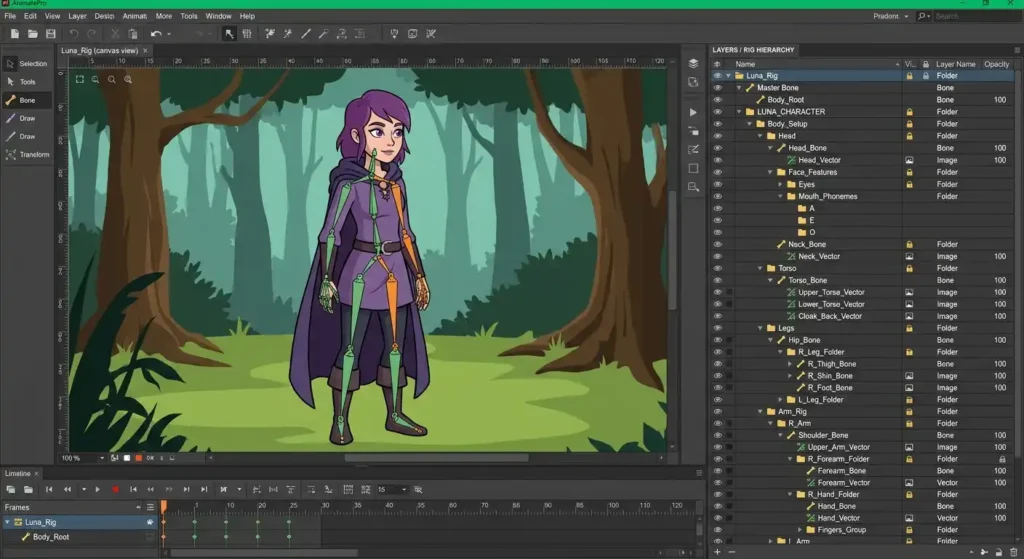
The other thing people forget is joint overlap. If a forearm ends in a flat edge, the elbow shows a gap the moment it bends. Draw a rounded cap on the end of each limb segment, and the joint can rotate freely without exposing missing art.
For canvas size, bigger is safer. Around 4000 pixels wide gives you room to zoom in on swatches and face details. The “300 DPI” number only matters if you’re printing, and then you’ll want CMYK instead of RGB. For anything that stays on a screen, RGB is fine. Keep line weight consistent, whether you’re using vector lines or a good raster brush.
How the sheet changes by project type
| 2D animation | Game assets (3D / sprites) | Children’s book or comic | |
| Main goal | Consistency across frames and rigs | Clean reference for modeling and texturing | The same character on every page |
| Standard pose | Neutral or relaxed A-pose | T-pose with straight limbs | A pose with some storytelling in it |
| Turnaround views | 3 to 5 | 3 (front, side, back) | 2 to 3 |
| Biggest detail focus | Simple shapes that are quick to redraw | Equipment and clothing texture | Costume continuity and emotional range |
Mistakes that cost the most
Don’t let the proportions drift. The biggest mistake is letting proportions shift between angles. If your character’s torso measures three heads long in the front view, then keep it at three head units in profile. Draw according to your guidelines rather than drawing each angle from scratch.
Cut out extra detail. Rule out the over-designed costumes. Adding extra pockets, tiny patterns, and hairline details sounds professional, but redrawing them hundreds of times slows down production. Simplify the costume so there is no confusion left about characters.
Unmarked asymmetry. Finally, clearly mark an asymmetrical detail like an eyepatch, a pouch on one hip, or a scar and label which side it belongs to, both front and back views otherwise soemone will mirror it by mistake.
Quick answers
1) Is a design sheet different from a model sheet?
Yes. Animation studios call it a model sheet, while game and concept artists call it a character design sheet.
2) How many turnaround views do I need?
Draw three views (front, side, and three-quarter front) for most projects. Add the two back views only whenever you are going to build 3D models or 2D rigs.
3) Should I use an A-pose or T-pose?
Use a T-pose for 3D mesh work and A-pose for 2D cutout information.
One last thing
The sheet doesn’t have to be pretty. It has to be right, and it has to be easy to find the answer on. Set up your guidelines before you draw a single detail, test the silhouette early, and put the notes you’d want if you were the person picking this up cold.